
Implementation
Now you have designed your eHub, you are ready to start implementing it so that it works with your current Standard Operating Procedures (SOPs).

Implementation
Building a successful eHub requires:- Effective training provided to the eHub team on the functionality of the Smart Inbox
- An understanding of the limitations
- Standardised ways of working underpinned by SOPs that have been tested with real scenarios and examples
How long will it take and who is involved?
We approximate that the technical implementation and set up for the Smart Inbox will take around two weeks, but will also be dependent on the time you allocate to testing the Smart Inbox.
What is the Smart Inbox?
The Smart Inbox is a purpose-built platform for digital triage and online consultation management. It has been designed to reduce the reliance on third party software that has not been built for quick triage decision making.
It enables you to boost your productivity and foster better collaboration between healthcare and practice professionals and it has been designed to support modern delivery of care across digital platforms and at scale.
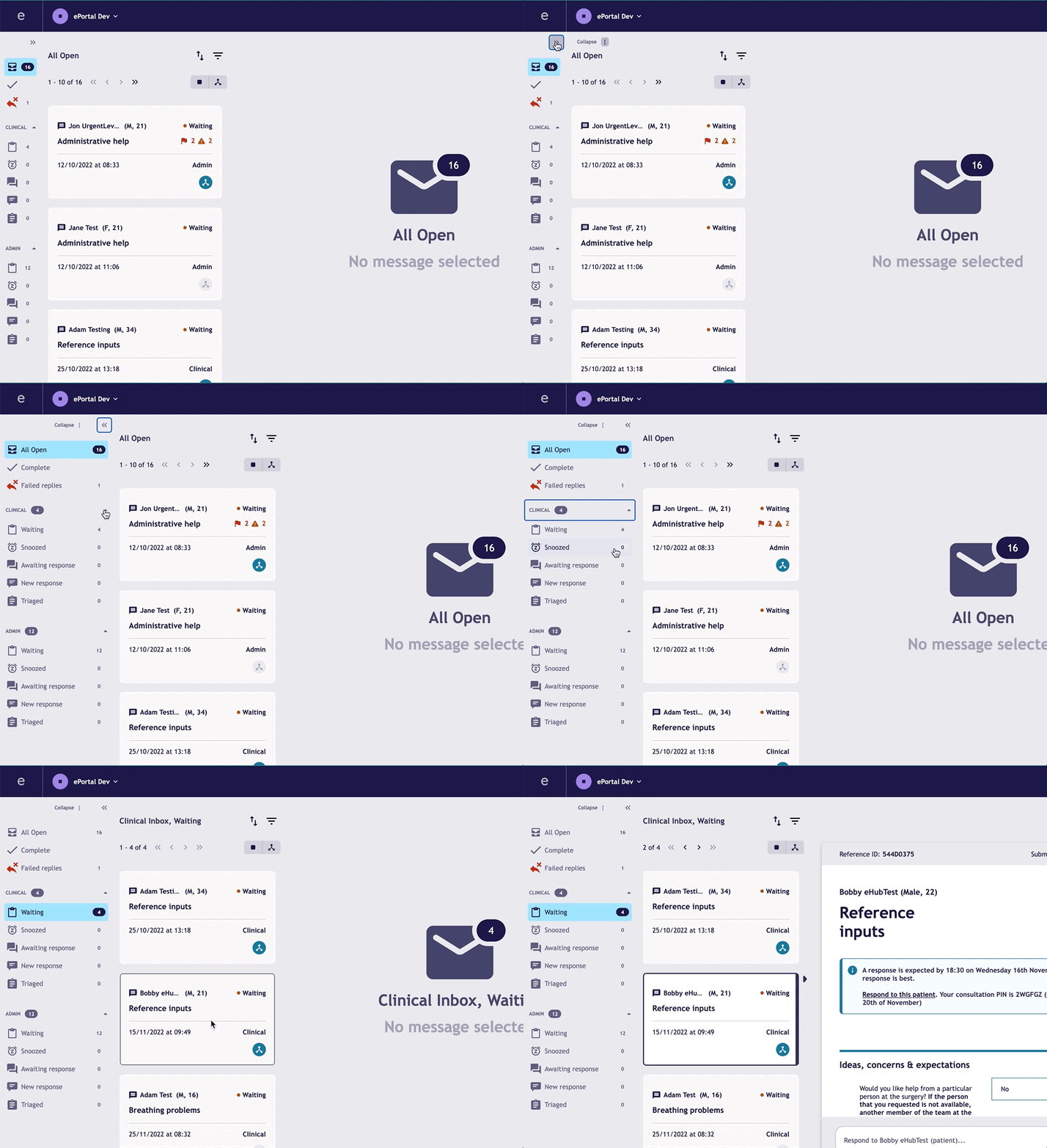
The smart inbox allows multiple staff members to work collaboratively from the same space, working off of the same queue and enables you to triage efficiently. The smart inbox split the incoming eConsults automatically between administrative and clinical templates, ultimately saving your admin team time.
We know that users in your practice or eHub will be sharing access to the Smart Inbox and we want to ensure that there is no duplicate work being done and that you have transparency when other clinicians or admin members are working on an eConsult. The multi-user collaboration feature means that you can easily see who is working on an eConsult to ensure you can work efficiently and quickly with your practice and eHub colleagues!
Why should I do this?
Utilising the Smart Inbox enables a collaborative working environment. With robust SOPs in place the Smart Inbox can enhance a standardised approach to working across your eHub. The use of filters and sorting functionality boosts efficiency and clinical safety.
How to get started:
To get started, we need you to fill out our Smart Inbox order form* which includes the following documents:
- Terms and Conditions
- Data Processing Agreement
- Privacy Notice
- Service Definition
- Practice Users List
Once we receive your order form we will be in touch to work through the next steps to get your practice live with Smart Inbox.
We are continually improving the Smart Inbox and new features are frequently rolled out and you will be notified about new updates from within the Smart Inbox.
*The order form must be completed by someone with the right to sign legal documents on behalf of your practice.
Top tips:
- To create and test new processes and SOPs to incorporate the Smart Inbox
- Allocate time to train your team on your new processes
- Allocate time to test your new processes
- Agree how you will use certain features of the Smart Inbox, to ensure a standardised approach to working
- Encourage the practice team to sign up and attend our smart inbox training sessions and webinars
For more information on training see the below information!
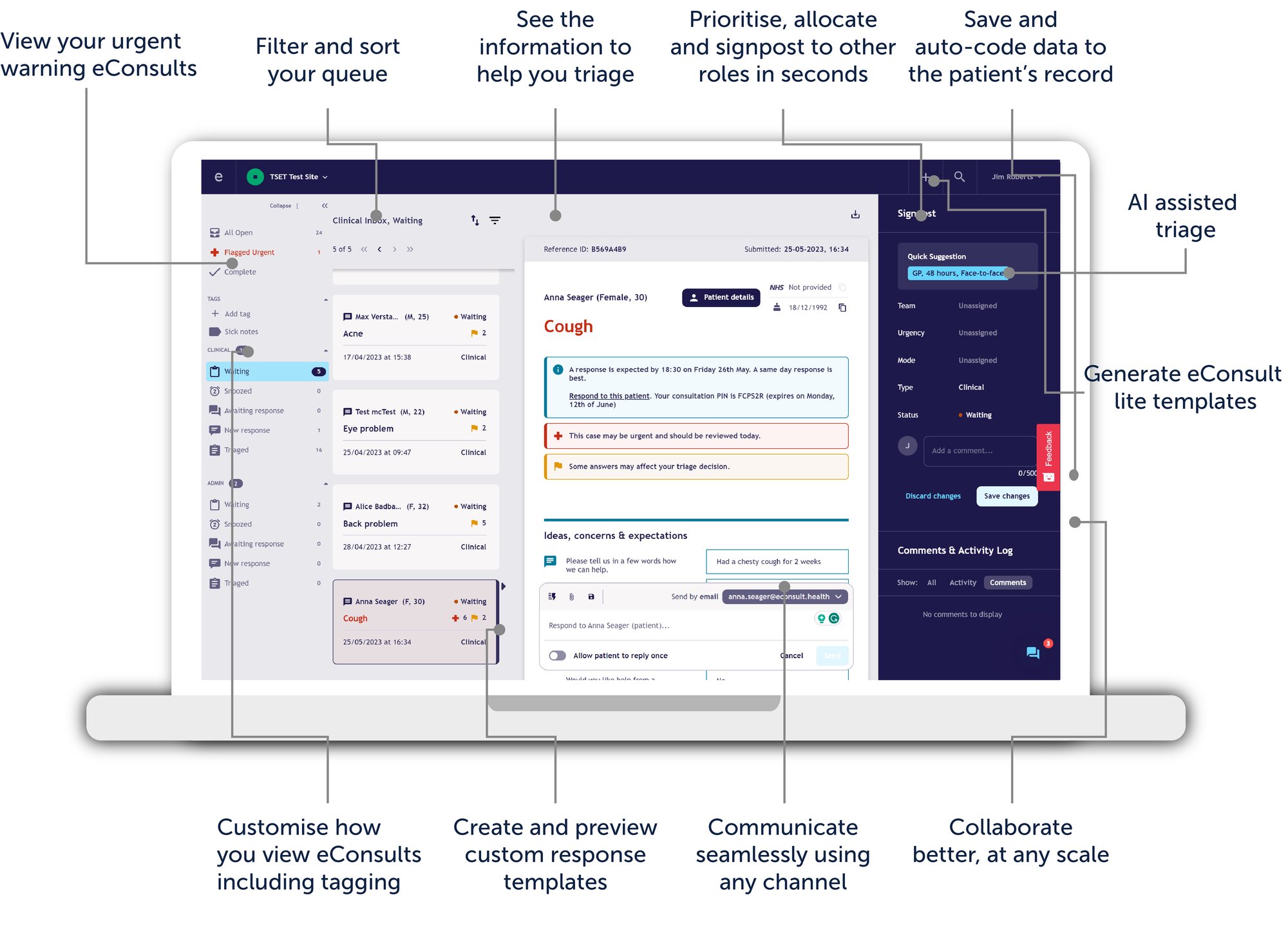
Built for single or multiple practices
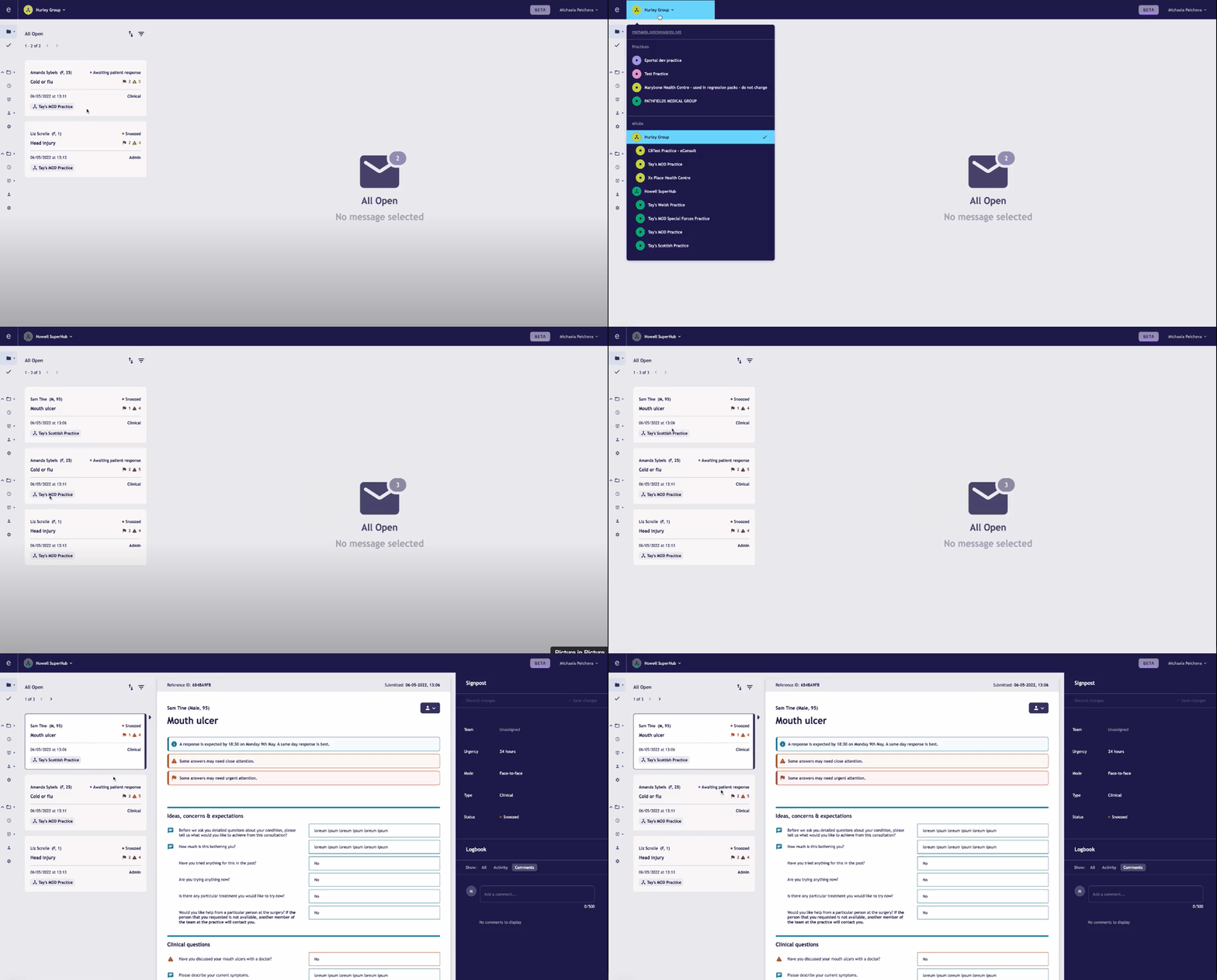
Our Smart Inbox is built to work for single or multiple practices with change management support for setting up an eHub for federated PCN working:
- Signpost: View, search, filter and sort your eConsult queue to easily triage patients based on the type of consultation (clinical vs administrative), number of flags (acuity), age or time since submission.
- Collaborate: Assign eConsults to specific roles, select their response urgency and mode and leave notes for colleagues.
- Interop & code: Save consultation information, outcomes and SNOMED codes into the patient record to manage and track your patient contacts.
- Communicate: Pick your communication channel, use custom responses, and allow patients to respond and see their replies in a thread - all in one view.
- Scalable: Built to work for single or multiple practices with change management support for setting up an eHub for federated PCN working.
How long will it take and who is involved?
The project manager should lead the UAT to ensure the relevant steps are complete prior to going live. This should take one to two hours.
What is User Acceptance Testing?
UAT is the final stage of implementation before going live. This acts as a step by step sign off that the Smart Inbox is set up and configured correctly and the practice is able to access, and perform all the features.
Why is it important?
This is the stage you can identify if any last minute technology support or training is required before the go live date!
How to get started:
- Download our User Acceptance Testing checklist from our resources page
- Complete the step by step guide
Top tips:
If you encounter barriers during the UAT contact our operations team for support!
What are the limitations and considerations?
The Smart Inbox has some limitations and considerations that we recommend taking into account:
- User access are managed by eConsult
- Individual images need to be deleted by eConsult
- API limited to one clinical system
- Cannot automatically assign to eHub - this will need to be a manual process
- When logging in via the toolbar you can only save to record on the associated practice, logged in on the clinical system
We also have some specific items that we recommend your eHub aligns on when using the Smart Inbox:
- Use of the signposting and/ or tagging features
- Definitions and standardised uses of these features
- Internal SOPs to manage the folders including but not limited to:
- Length of time an eConsult should sit in any subfolder
- When the folders should be checked
- Who is responsible for which folder
- How and when to send eConsult back to the practice or to the eHub (depending on entry model)
Why is it important?
Without considering the limitations, you are at risk of not embedding Smart Inbox correctly within your eHub. This subsequently can limit the eHub potential and ultimately its functionality.
How to get started:
- Agree how you will use certain features of the Smart Inbox, to ensure a standardised approach to working
- Create SOPs and processes to incorporate the Smart Inbox with the considerations in mind
- Ensure your team is aware of the functionalities within the Smart Inbox as well as the limitations
Top tips:
Training your eHub team on the processes is essential. We recommend testing the processes by sending test eConsults prior to going live.
Training
Now you have designed your eHub, the practices within the eHub are onboarded, you are ready to start training.
This will give practice staff awareness of how to use the Smart Inbox, prior to moving the workstreams to the eHub, therefore, the eHub staff as well as practice staff will need to have training on how to use the Smart Inbox.
How long will it take and who is involved?
Training should involve all team members, it is vital that everyone working within the eHub and alongside the eHub (in the member practices) understand how the eHub works in context of their role. Organising the training sessions around working patterns and clinical sessions may take several weeks.
Why should I do this?
The training needed to implement a successful eHub is not solely about the technology, great consideration must be given to the people involved. Adopting the tools alone will not transform care, they must be combined with a new way of working. Training is needed to upskill all staff on how to centrally manage online consultations at scale.
How long will it take and who is involved?
The training will take approximately two hours, and will require each member of staff, who will be using the Smart Inbox, to attend a session with the eConsult Transformation Team.
Why is it important?
The Smart Inbox training is essential to ensure that your team are aware and utilising the appropriate features. The training will also promote a standardised way of working and examples of how to navigate the Smart Inbox.
The training will cover the different features of the Smart Inbox such as:
- Signposting and tagging
- Automatic patient matching and resolving unmatched patients
- Save to record feature
- Opening the patient record from the Smart Inbox
- Viewing images
- Messaging the patient and two-way messaging
- SNOMED CT
- Remote closures
- Audit trails
How to get started:
- Ensure that staff using the Smart Inbox are aware of the Smart Inbox Q&A and training webinar
- Utilise available online resources (such as our articles and eConsult's YouTube "How To Guides")
- Encourage staff to submit "dummy" eConsults prior to going live, to understand the journey for the patient and how to process eConsult through the smart inbox
- Train using real scenarios, include challenging cases.
Top tips:
Train with a systematic approach by scripting scenarios based on a few varied common GP complaints, e.g. minor illness, an injury, a women’s health problem, an urgent problem or a query about some newly-prescribed medication and ask staff to test how the system responds and how well practice processes are working.
You can use the Competencies Checklist available below which allows the team to both complete and provide evidence of training completion

Clinical Training
How long will it take and who is involved?
Allocating time to ensure that you have informed the clinical team of this new way of working is important. This should take about one to two hours and will require senior management & clinicians leading with the eHub implementation to support.
Why is it important?
To maximise your remote closure and efficiency using the smart inbox it is vital that case based learning on real eConsults. Without this, clinicians might not reap the full benefits of how the eHub can streamline the workload.
How to get started:
- Allocate protected time for clinicians to partake in training
- Involve the clinical team in the process planning stage
- Review available resources

Admin Training
How long will it take and who is involved?
Allocating time to ensure that you have informed the admin team of this new way of working is important. This should take about two to three hours and will require senior management & clinicians to support and train the admin team.
Why is it important?
It would have a significant impact on your workflow and processes if the admin team are not confident and trained to use the Smart Inbox. Providing the relevant resources for the team such as SOPs, the process of raising Significant Events and triage toolkit / crib sheet is essential.
How to get started:
- Utilise the Competencies Checklist available in our resources page, the team can complete and evidence as completion of training
- Additional training elements can be added to the checklist. Such as:
- Communication lines with practices & ensuring that the team have an up to date list of contacts for practices and bypass numbers
- Clinical system training (cross organisational booking)
- Additional training elements can be added to the checklist. Such as:
- Provide relevant resources such as SOPs with your team, to refer back to when or if required
- Consider having a troubleshooting guide

Care Navigation Training
How long will it take and who is involved?
Initial training would take around two hours to complete, however, this will be an ongoing process. It is beneficial for the clinical team to have input at this stage, to assist with upskilling care navigator and administrators
Why is it important?
Care navigation training will help your team with the navigation of the eConsults, eConsult lite and any other clinical activity received in each practice and will support your clinicians with managing patients requests. In addition, it will help with triaging and signposting patients to the most appropriate health professionals and/or services. Overall improving safety and efficiency.
Having a robust and efficient care navigation process and team in place can positively impact the workload for your clinicians. A skilled care navigation team can reduce the amount of unnecessary appointments and smooth the patient flow into the practice. The team will be able to understand and successfully signpost patients to receive the right care, from the right person at the right time.
How to get started:
- Upskill & train your staff to efficiently care navigate incoming eConsults, manage eConsult lites and other clinical activity
- Allocate time for clinicians to sit with the care navigation team to support & train them from a clinical perspective
- Provide the team with the Care Navigation Toolkit, the template can be accessed in the resource page. This toolkit can be used for the admin team to refer to when signposting
- Allocate time to review and amend the Care Navigation Toolkit periodically
- Inform your care navigation team of the eHub's process of what to do if they are unsure about an eConsult or clinical activity
- Train using scripted scenarios based on a few varied common GP complaints, such as minor illness, an injury or a query about some newly-prescribed medication. Ask staff to process the eConsult and demonstrate how they would manage this
What next?

Review
Following the implementation of your eHub, reviewing the progress and performance is vital for success! The review section includes the Project closure and monitoring phase.

Resources
You can find all the resources to help you build and run an eHub. We have collated all of the resources mentioned on the site on this page.

Transformation Support
Find out how to set up an eHub! Our team are experts at supporting federated models to manage demand at scale, maximising your team's skills.