
Resources
You can find all the resources to help you build and run an eHub. We have collated all of the resources mentioned on this site below.
Finance
Practice and PCN Income Ready Reckoner 2023/24
The Ready Reckoner is intended to provide an indication of the changes in income streams that may affect a GMS practice and Primary Care Network (PCN).
On demand webinar - DES funding explained: How to unlock the funding and plan for your PCN’s future
Our on demand webinar explores the DES funding available for your PCN. The webinar looks at the enhanced access requirements, digital infrastructure and maximising ARRS roles.
Standardised GP Appointment Categories
The NHS publication provides guidance on standardising appointment slot mapping to enhance data quality nationally.
Network Contract DES – contract specification for 2023/24
The NHS publication details the PCN requirements and entitlements for funding for the 2023/24 financial year.
Project Management
Gap Analysis Template
Tool to identify the gap between your current situation (where you are now) and your future/desired state (where you want to be), along with outlined tasks that you need to complete in order to close the gaps.
Get started with the template and examples!
Risks Actions Issues Decisions (RAID) Log
Project management tool to assess key risks, issues and dependencies that can occur. The risk log records information such as triggers, probability, impact, mitigation, owner, et cetera for things that could go wrong but have not yet occurred.
Get started with the template and examples!
eHub Designer
The eHub designer is the template used to model your eHub; it is the blueprint for successfully implementing your eHub. There are over 1000 different eHub models. It is needed as this will be the implementation of your new way of working.
Process Mapping - Editable Files
The editable files are available to use via Draw.io. It is a free processing mapping program. You can view/edit the diagrams to your own specification.
To access these files:
- Click the link - an XML page will open
- Right click and "Save as"
- Open Draw.io
- Create new, blank document
- File > Import from > Device
- Choose the saved file
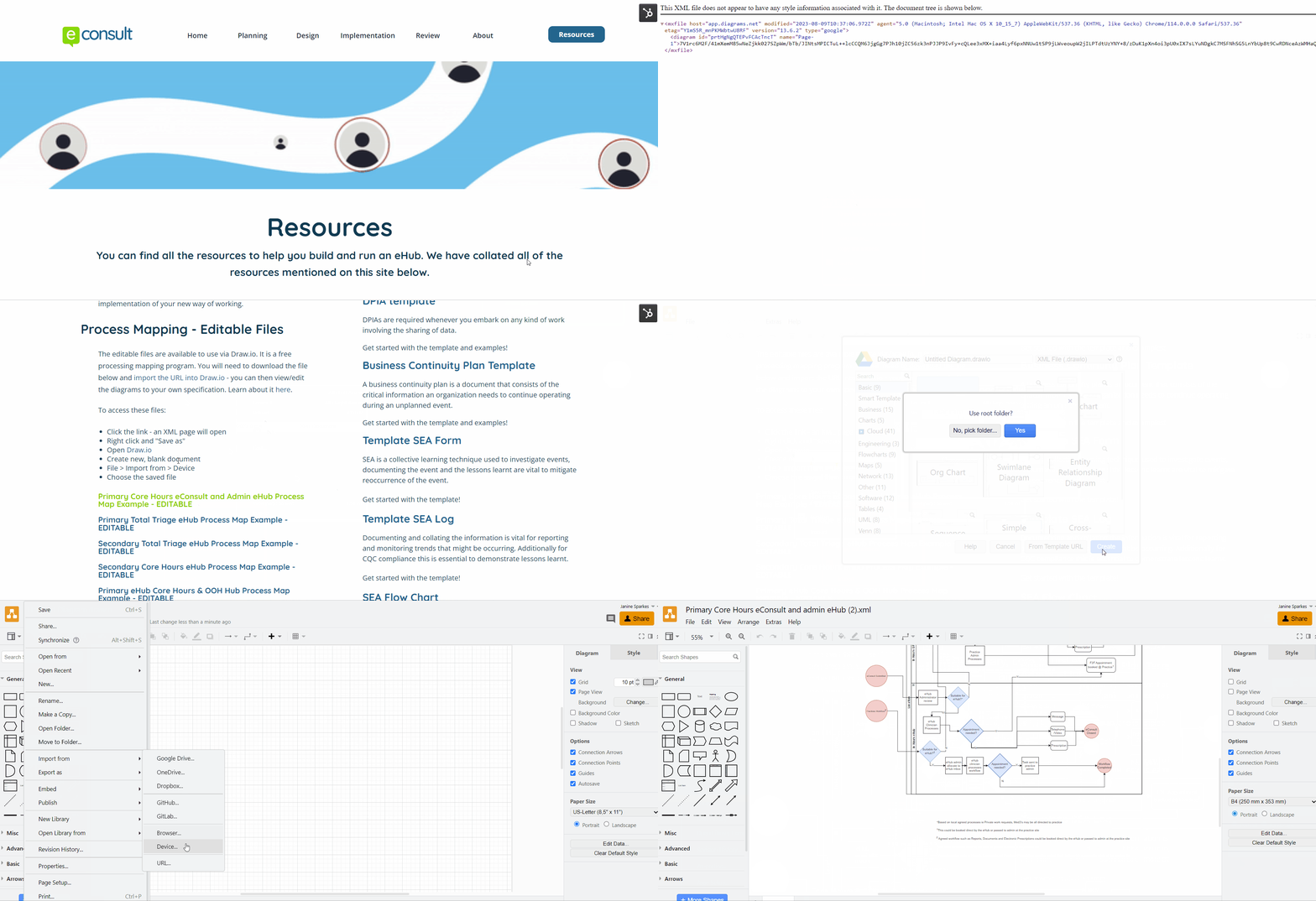
For more information on how to import the XML file - click here.
Governance
DPIA template
DPIAs are required whenever you embark on any kind of work involving the sharing of data.
Get started with the template and examples!
Business Continuity Plan Template
A business continuity plan is a document that consists of the critical information an organization needs to continue operating during an unplanned event.
Get started with the template and examples!
Template SEA Form
SEA is a collective learning technique used to investigate events, documenting the event and the lessons learnt are vital to mitigate reoccurrence of the event.
Get started with the template!
Template SEA Log
Documenting and collating the information is vital for reporting and monitoring trends that might be occurring. Additionally for CQC compliance this is essential to demonstrate lessons learnt.
Get started with the template!
SEA Flow Chart
Learning and developing from experiences both positive and negative can be vital in the success of your eHub. Therefore it is essential that the team understand the process and the flow of information.
Privacy Notice Addendum
When setting up the eHub, preparing for sharing patient data and being transparent with patients about how data is used is a requirement of the Data Protection Act 2018, is vital.
Get started with the template!
Smart Inbox Terms and Conditions
Read our Smart Inbox Terms and Conditions here!
eConsult Primary Care: Service Specification
Our service specification sets our what is provided with eConsult's Primary Care Services; including information on integration to the clinical system integration and NHS app integration.
Smart Inbox Data Protection Agreement
Our data protection agreement details how patient data is protected and information on compliance with the Data Protection Act.
GP Online Consultation Service Privacy Notices
By law, all organisations using personal information or data must provide a clear description of how it is used, providing related information to ensure processing is carried out lawfully and fairly.
Get started with our Online Consultation Service Privacy Notice!
Workflow and processes
Process Mapping Examples
Process mapping is a visual representation (a picture/model) of all the relevant procedures and administrative processes involved in the patient journey. The map conveys how things are, and what happens in the patient journey.
Get started with the downloadable resources as a guide!
Here is a great free online diagram software for making process maps!
eHub SOP Template
SOPs ensure reliability, efficiency, and consistently hitting quality standards in regular work activities.
Get started with the template!
Clinical service delivery
Care Navigation Toolkit Resources
Care navigation describes the way we signpost/direct patients from their initial point of contact e.g. a GP to the most appropriate point of care for their need e.g. a different health service provider.
Our downloadable and customisable tool helps your practice to get started with care navigation
Care Navigation and Admin Led Triage Webinar
Join our pre-recorded webinar to hear from an experienced Care Navigation Lead, Rachel Madden, and Dr James Perry, both from Marine Lake Medical Practice in The Wirral, about how they have successfully implemented total triage at their practice.
To hear about other upcoming webinars visit our website!
Communications
Educating Patients and Raising Awareness
Resources and tips for education patients on eConsult. Including a message for your phone line, text message examples for a text campaign, scripts for the front desk team in practice, newsletters and relevant blogs.
Practice Website Guides
Resources and videos to promote to patients on how eConsult works, the benefits and how they would eConsult.
eConsult Website Banner
Patients access eConsult on your practice website, so it is important that the eConsult banner is well placed. It should be easy and obvious to find on the landing page, ideally one of the first things you see when you open your practice website.
Using Social Media to Engage with Patients
Resources available for instant download and tips on engaging patients through Social Media. It can be a great way to communicate with a large number of patients quickly and cheaply. It’s the perfect place to share eConsult links and templates, benefits and how it works.
Materials for your Practice Waiting Room
Your practice waiting room is a great place to promote the benefits of eConsult and how it works. Resources are available for instant download.
Smart Inbox
Smart Inbox and eHub Case Studies
eConsult has supported a number of eHubs since the first federated working model in 2017. Take a look at some of our latest case studies!
Free Care Navigation Tool for GP Practices
There are several tools used by practices to help administration teams feel comfortable and upskilled when it comes to triaging eConsults. Our free-to-use care navigation tool, is available to use and is completely customisable to your practice.
It’s essential that your clinical team completes this document in order to ensure it’s felt to be safe and appropriate.
Get started with the template and examples!
User Acceptance Testing (UAT) Template
The UAT is a step by step sign off that the Smart Inbox is set up and configured correctly and the practice is able to access, and perform all the features.
This is the stage you can identify if any last minute technology support or training is required before the go live date!
Get started with the template and examples!
Training
Smart Inbox Competencies Checklist
Following a Competencies Checklist can enable standardisation of which features each team member has awareness of and trained on. Once complete this can form as evidence as completion of training for the HR file.
Get started with the template and examples!
eConsult Upcoming Webinars
Our webinars are here to help you get the most out of eConsult. We have a mix of live webinars and on-demand webinars that you can watch at any time. We’ve broken them out into relevant topics for ease.
Setting Up eHubs & Online Consultations - Webinar
Watch our on demand webinar which demonstrates what an eHub means from a service and workflow design perspective and how the Hurley Group runs its eConsult eHub. The webinar explores the different models of eHubs and benefits felt by practices and PCNs already using eHubs to manage their online consultations centrally.
NHS Blueprint - The Folkestone, Hythe and Rural PCN Hub Pilot Project
The NHS England blueprint document, provides an overview of
the development of the Folkestone, Hythe and Rural Primary Care
Network (PCN) hub. The document demonstrates how it works and what it delivers for staff and patients.
Reporting
Emis Template Example
To ensure continuity of your coding on your clinical system it is important to standardise your templates. This will allow for better data quality when it comes to reviewing your eHub's performance.
Get started with the template by importing this into your clinical system!
Emis Report/ Search Example
Searches are a useful tool to monitor the output from your eHub and to make improvements to drive efficiency.
Get started with the example by importing this into your clinical system!
NHS Digital SNOMED Code Request
Specific codes can be requested from NHS Digital here. The need for the code will need to be justified and aligned to the usefulness for all NHS users, this is key to getting it accepted.
Plan, Do, Study, Act (PDSA) cycles and the model for improvement
The NHS Improvement has published a document, detailing a framework for developing, testing and implementing changes leading to improvement. Check out the NHS document.
eHub Clinical Audit Template
Find out if your eHub is providing a service in line with standards and lets you and your team know where your service is doing well, and where there could be improvements.
Get started with the template and examples!
Understanding Weekly eConsult Reports
As a practice it is important to understand the data on your eConsult dashboard to allow your practice to successfully adopt online consultations (OLC), planning your demand in terms of workforce and appointment requirements.
GP Patient Survey Data
Gives you and overall view of practices of groups of practices. The survey drills down into patients accessibility into the practice and many other aspects of their contact and outcomes with the practice.
Friends and Family Test Data
Latest Friends and Family data can be accessed and downloaded in excel form so you can extract it and create charts.